DDM diagnostics
The software can read the transceiver's Digital Diagnostic Monitoring (DDM) data in real time.
To read DDM data, select the connected module type and go to the menu: Tools - Digital diagnostic monitoring
The diagnostic reading control panel contains the following elements:
Control panel buttons

- Clear data
- Save a DDM report
- Start reading DDM
- Load a DDM data file
- Load thresholds
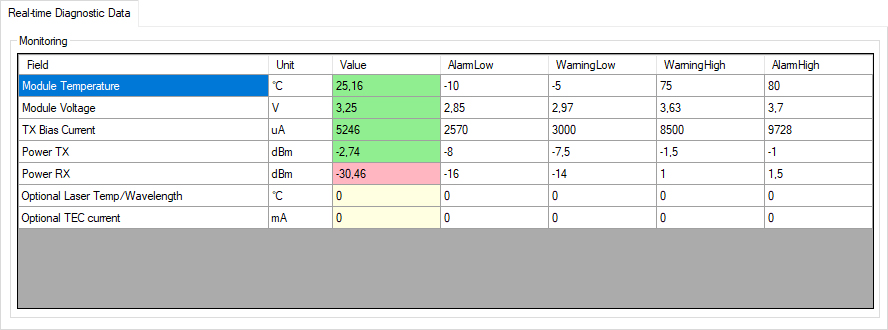
Real-time data table
Contains decoded threshold table registers and the current DDM parameter values.
When processing DDM values, the application compares the current parameters with the configured thresholds and records excursions in the Alarms & Warnings area.
Color coding for current parameter values:
- Green — normal operating range
- Yellow — the parameter has entered the warning range (Warning)
- Red — the parameter has entered the alarm range (Alarm)
Change history
Timestamp           Module Temperature            Module Voltage                TX Bias Current               Power TX                      Power RX                      Optional Laser Temp/WavelengthOptional TEC current
---------------------------------------------------------------------------------------------------------------------------------------------------------------------------------------------------------------------------------------
17:06:13            25,95 °C                      3,25 V                        5242 uA                       -2,73 dBm                     -29,59 dBm                    0 °C                          0 mA
17:06:09            25,02 °C                      3,25 V                        5242 uA                       -2,72 dBm                     -28,86 dBm                    0 °C                          0 mA
17:06:05            24,16 °C                      3,25 V                        5242 uA                       -2,72 dBm                     -30,97 dBm                    0 °C                          0 mA
17:06:00            22,62 °C                      3,25 V                        5242 uA                       -2,72 dBm                     -29,59 dBm                    0 °C                          0 mA
17:05:56            21,64 °C                      3,25 V                        0 uA                          -40,001 dBm                   -40,001 dBm                   0 °C                          0 mA
17:05:52            20 °C                         3,25 V                        0 uA                          -40,001 dBm                   -40,001 dBm                   0 °C                          0 mA
17:05:47            18,33 °C                      3,25 V                        0 uA                          -40,001 dBm                   -40,001 dBm                   0 °C                          0 mA
Checksum
The status line contains the CC_DMI checksum, which indicates the integrity of the factory-set threshold table. The checksum is located on page A2h at offset 5Fh.