Finding a transceiver password
The software supports password searches for programming write protected transceivers and recovering forgotten passwords. This feature can be particularly useful when you need to check a series of passwords within a narrow range quickly.
The software also supports dictionary based password searches, which can significantly speed up the search.
How do I start a password search?
Read the instructions carefully and follow the steps exactly.
- Read the transceiver's main memory page
- Change the code in the editor
- Go to the menu Control - Search password
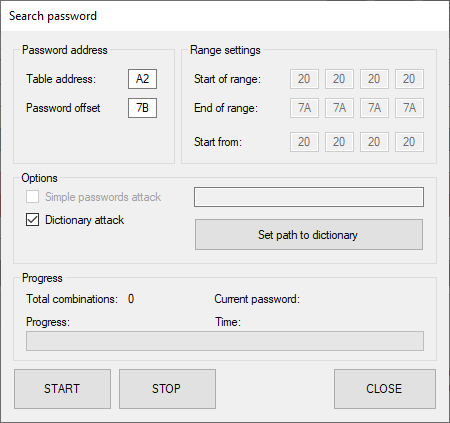
- In the Search password window, configure the password entry location
- Specify the password search range OR select Dictionary attack for a dictionary based search.
- Specify the dictionary file path if Dictionary attack mode is selected
- Click Start to begin the search.
The communication protocol between the coding board and the transceiver has no operation that confirms a completed write. This means the coding board receives no confirmation from the transceiver that writing succeeded. To verify the result on each password attempt, the coding board reads back the transceiver memory and compares it with the data in the application editor.
If the data matches byte for byte, the write is considered successful. The operation log displays WRITE OK and the search stops. If it does not match, the application returns WRITE FAIL and the search continues.
After a successful write to the module is confirmed, the search stops automatically and displays the password found:
2024-02-10 11:25:46 > Enter password
2024-02-10 11:25:46 > w1A2007B03AABBCCDD
2024-02-10 11:25:47 > Write Table A0 add. 00,  128 byte(s) from 00
2024-02-10 11:25:47 > W1A000007F0304070000000120400C15012A0000000F07000046494E4953415220434F5250323334200000906546544C46383532345032424E56202020412020200352009C0032000050423931595A57202020202020202020303730323237202068D8010B0000000000000000000000000000000000000000000000000000000000000000
2024-02-10 11:25:49 > 0304070000000120400C15012A0000000F07000046494E4953415220434F5250323334200000906546544C46383532345032424E56202020412020200352009C0032000050423931595A57202020202020202020303730323237202068D8010B0000000000000000000000000000000000000000000000000000000000000000
2024-02-10 11:25:49 > WRITE OK
2024-02-10 11:27:26 > Found password: AABBCCDD
Please note
If you start the password search without first changing the transceiver's original code in the editor, the coding board returns WRITE OK on the very first write attempt because it considers the write successful. This happens because the data in the editor already matches the data in transceiver memory.
The application then displays a false password found message. The reported password will not allow you to write subsequent changes.
This occurs when the required sequence of steps is not followed before starting the password search. After reading the module and before starting the search, you must change the firmware code by at least one byte so that the data in the editor differs from the data in transceiver memory. Otherwise, the password search returns a false positive for any password value.
Video guide
Note
- Total possible password combinations: 2564 = 4 294 967 296