Transceiver memory structure
A transceiver's EEPROM stores persistent data that equipment uses to identify the module. The management interface also provides access to diagnostics, status and settings. The entire memory image is often informally called "SFP firmware," but persistent identification data, live registers and the controller's internal software are different things. Writing identification fields does not change the module's physical design.
The following sections explain Serial ID, A0h/A2h and the differences between SFP, XFP, QSFP and CMIS modules. Addresses and mandatory functions depend on the specific memory map and its revision. In SFPTotal Wizard, select the appropriate Module Type and Address table rather than relying only on a similarly named field.
EEPROM, Serial ID and live registers
| Data | Purpose | Considerations when making changes |
|---|---|---|
| Identification / Serial ID | Manufacturer, part number, serial number, advertised interfaces and other information. | Equipment uses these fields for identification. They do not, by themselves, prove the module's hardware capabilities. |
| Diagnostics and status | DDM measurements, flags and function status. | Values can change during operation; not all registers are writable. |
| Persistent and service settings | Calibration, manufacturer data and user areas where provided. | The applicable specification, access permissions and the procedure for the particular product are required. |
EEPROM may be a separate chip or be exposed through the module controller. A buffer read over I²C does not automatically reveal the internal memory architecture. Access and persistence procedures must be verified separately from a successful read.
SFP transceivers
SFP family memory maps based on SFF-8472 use the address spaces A0h and A2h. These are conventional 8-bit address notations that include the direction bit; in 7-bit notation, the corresponding addresses are 0x50 and 0x51. Do not confuse them with a byte offset or an additional page number.
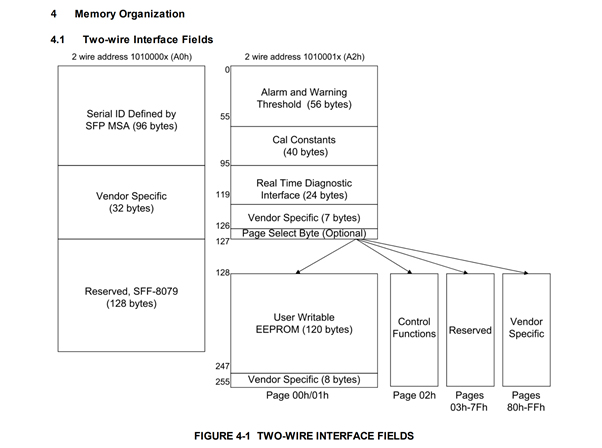
The diagram illustrates the memory organization. Check the applicable SFF-8472 revision for the exact field definitions.
A0h and identification fields
In SFF-8472 12.5a, the base and extended identification fields occupy bytes 0–95. Bytes 96–127 are allocated to Vendor Specific EEPROM. Bytes 128–255 are marked Reserved in this revision; they must not be described as a universal standard storage area for "compatibility code." A manufacturer's implementation may differ and requires separate documentation.
| Field | Bytes, decimal | Interpretation |
|---|---|---|
| Vendor name | 20–35 | Manufacturer name, 16 ASCII bytes. |
| Vendor OUI | 37–39 | A three-byte identifier, not a textual brand name. |
| Vendor PN | 40–55 | Part Number, 16 ASCII bytes. |
| Vendor Rev | 56–59 | Part revision, four ASCII bytes. |
| Vendor SN | 68–83 | Serial number, 16 ASCII bytes. |
| CC_BASE / CC_EXT | 63 / 95 | Checksum fields for the corresponding identification ranges. |
For example, Vendor PN starts at offset 40, or 0x28. The field is 16 bytes long, so its last byte is 55 (0x37). These addresses belong to the SFP memory map and must not be applied to a similarly named QSFP or CMIS field.
A2h and additional pages
A2h includes diagnostic, calibration and control areas. Additional upper pages are available when paging is supported; they are selected in the upper window at bytes 128–255. Do not assume that every SFP, copper module or DAC provides A2h, all diagnostic measurements or all additional pages.
There is no single mandatory password address for all SFP modules: SFF-8472 leaves vendor-specific functions to the manufacturer. Wizard documentation describes configurable password entry parameters, but their values must be checked against the module's implementation. See more about SFP write protection.
XFP transceivers
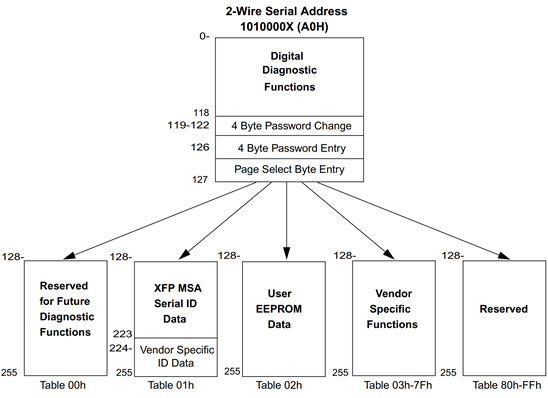
XFP uses its own management map defined in INF-8077i. The lower window and switchable upper tables must not be treated as the two SFP areas A0h/A2h. Wizard may label additional tables T00h, T01h and so on; this does not mean that offsets from SFF-8472 apply to them.
QSFP transceivers
For the QSFP family, first determine which management interface is used. SFF-8636 defines a lower window at bytes 0–127 and an upper window at bytes 128–255 with page selection. Upper Page 00h contains identification data; the content of other pages and the available functions depend on the product.
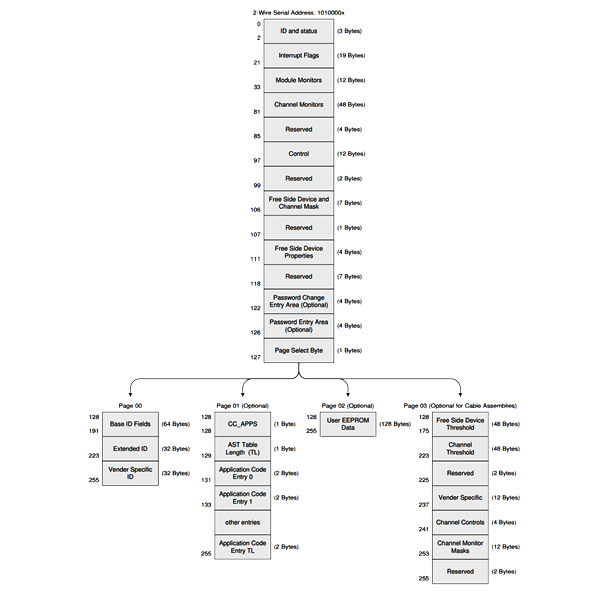
Page 02h in this map is user memory, rather than a mandatory image for a particular brand on every product. Some modern modules use CMIS. The applicable memory map matters more than a similar physical appearance or nominal data rate.
QSFP-DD transceivers
CMIS defines a common management model for several form factors. It distinguishes lower memory from an upper window; paged modules use page selection and, where provided, bank selection. The module advertises its supported pages and functions, which must be checked against the CMIS revision and the manufacturer's documentation. Flat memory and paged memory do not require the same operations.
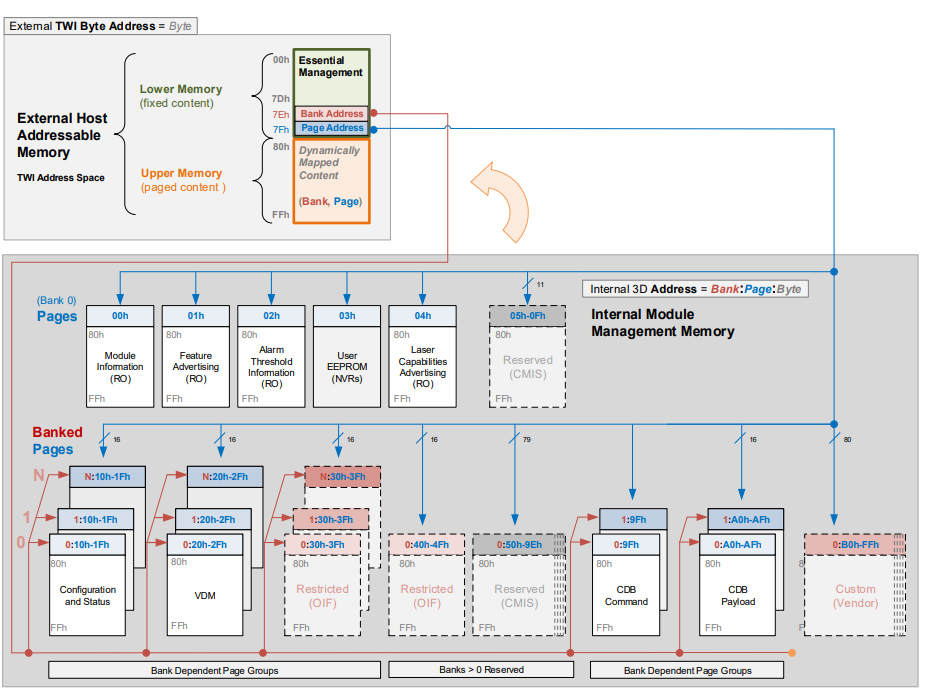
The illustration shows the addressing principle. Check the implemented CMIS revision for the page list and mandatory functions; the diagram does not describe the capabilities of every module.
OSFP transceivers
OSFP also uses CMIS, but this does not mean that all implemented pages and functions match those of every QSFP-DD module. Check the specific module's advertised capabilities, interface revision and coding board support. Physical form factor and electrical interface compatibility are separate from the common management model.
Reading, saving and modifying data in Wizard
- Identify the form factor, part number and revision. Select Module Type and Address table, then perform a Read code from module.
- Create a backup of the accessible areas. Record any pages that could not be read: an incomplete set must not be considered a complete product image.
- When choosing code, follow the Firmware Database recommendations. Check the memory map, hardware implementation and target equipment.
- Determine the write protection, prepare only the changes required and verify the checksums.
- After writing read the same areas again. Compare the persistent data, taking into account that diagnostic registers change during operation.
- Check identification and the actual connection in the target equipment. A successful memory write does not replace a link test.
Changing Vendor name, Part Number or compatibility code does not turn MM optics into SM optics or add an unsupported physical data rate. Overwriting calibration and service registers requires a separate, justified procedure.
Specifications and related resources
- SFF-8472 12.5a, Table 4-2, sections 4.3, 7 and 10.2 — SFP, identification fields and vendor-specific access.
- SFF-8636 2.12 — the management map for four-lane modules; INF-8077i 4.5 — XFP.
- OIF CMIS catalog — published revisions; applicability must be checked for the product.
- MSA, SFF and CMIS reference and reading DDM in Wizard.