SFPTotal Plus X
The SFPTotal Plus X coding board programs the memory of QSFP-DD, QSFP56, QSFP28, SFP28, XFP, SFP+ and SFP transceivers, including SFP RJ45, AOC and DAC. It supports programming password protected transceivers according to MSA SFF-8472, SFF-8636 and CMIS 5.0, as well as script based writing and programming modules with hardware write protection circuits.
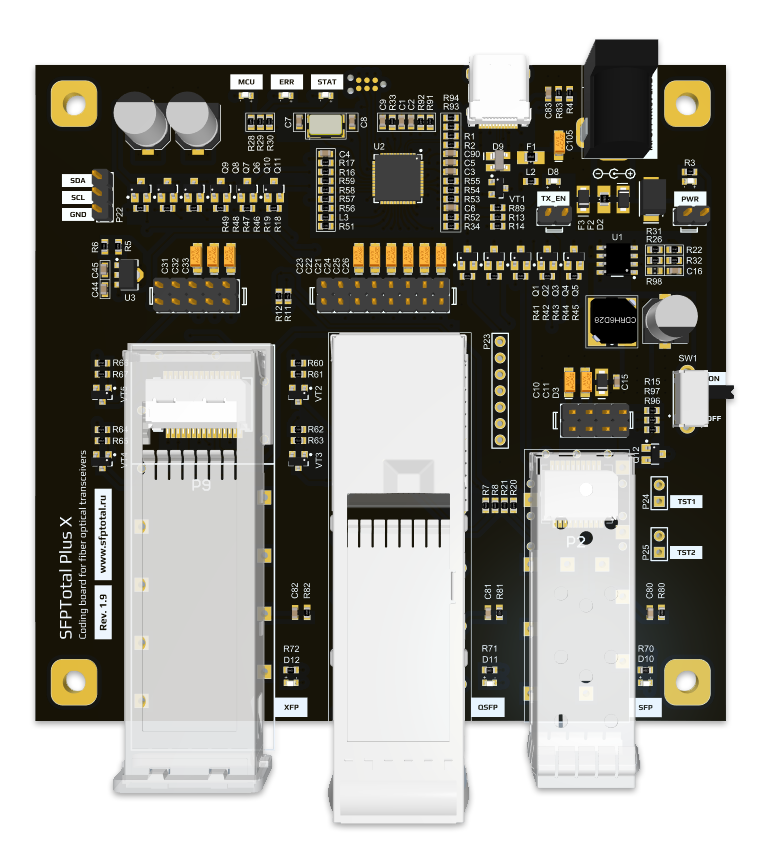
The device has SFP, XFP and QSFP-DD ports for transceivers, a USB Type C connector for connection to a PC, LED indicators, power control jumpers, and a connector for an external 5V DC power supply.
Applications
SFPTotal Plus X is used for the following tasks:
- Programming optical transceivers;
- Programming AOC and DAC cables;
- Ensuring module compatibility with network equipment from different manufacturers;
- Programming write protected transceiver memory;
- Reading transceiver diagnostic information in real time;
- Setting the channel of DWDM SFP+ tunable transceivers;
- Changing PHY controller settings;
- Rebranding OEM transceivers.
Main advantages
- Compact size;
- Full support for several form factors on a single device;
- Support for optical transceivers with data rates from 1.25G to 400G;
- No restriction to a particular transceiver manufacturer;
- Flexible control of write speed and settings;
- Support for programming transceivers with a password;
- Access to nonstandard transceiver memory addresses;
- Programming transceivers with hardware write protection;
- External power supply support for high power transceivers;
- Hardware password search support;
- Technical support from the manufacturer.
Quick start
Installing the device driver
For correct operation, install the device driver before connecting the device for the first time. It is available on the download page.
Windows 10 / 11 include drivers for SFPTotal Plus X by default. Simply connect the device to the computer and wait for automatic installation to complete.
If the operating system does not include a driver or special driver installation policies apply to new devices, follow the driver installation instructions.
Some versions of Windows require a system restart after driver installation for the virtual serial port device to work correctly.
Software
Use the official SFPTotal Wizard software to work with the device. It provides a convenient interface for editing, reading and writing transceiver memory.
No preliminary device configuration or calibration is required to start using the application.
For complete software instructions, see the User Guide.
Connection settings
Connect the coding board to the computer's USB port using the supplied USB Type C cable. The operating system detects a new device when it is connected for the first time.
By default, no connection configuration is required. The application automatically detects the coding board connected to the PC.
If the application was previously configured for a direct device connection, open the menu Connection - Connection Settings.
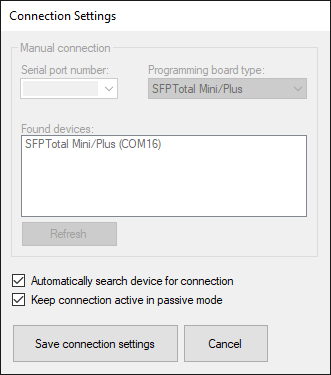
Reset Serial port number, select Programming board type for your device and select Automatically search device for connection to connect to the coding board automatically.
Save the connection settings by clicking Save connection settings.
Device activation
The SFPTotal Plus X is supplied with limited functionality and requires activation before use.
See the section Device activation.
Connecting a transceiver
Connect the transceiver to the SFP port inside the metal cage. When inserting it, the label on the module casing must face upward.
Insert the transceiver into the port and push it in gently until it clicks. The latch on the transceiver casing must engage with the port cage.
When the transceiver is correctly installed, the STAT LED stops flashing and stays on. The coding board is ready for use.
To remove the transceiver, swing out its bail to release the latch, then hold the sides of the module with two fingers and pull it out of the port. Do not pull on the bail, as it may break.
Controls
The coding board has the following status indicators and controls:
Power control
-
The SW1 slide switch controls power to the transceiver ports.
-
The PWR jumper duplicates the power switch function. Measuring equipment can be connected in series with the power supply at this point.
LED indicators
-
The MCU indicator lights up when the device is connected to a computer.
-
The STAT indicator flashes when power is on and the device is waiting for a transceiver. It stays on when a transceiver is connected to a port.
-
The ERR indicator stays on when the device detects a data bus fault or lockup.
-
The SFP indicator lights up when a transceiver is connected to the SFP port.
-
The XFP indicator lights up when a transceiver is connected to the XFP port.
-
The QSFP indicator lights up when a transceiver is connected to the QSFP port.
Jumpers
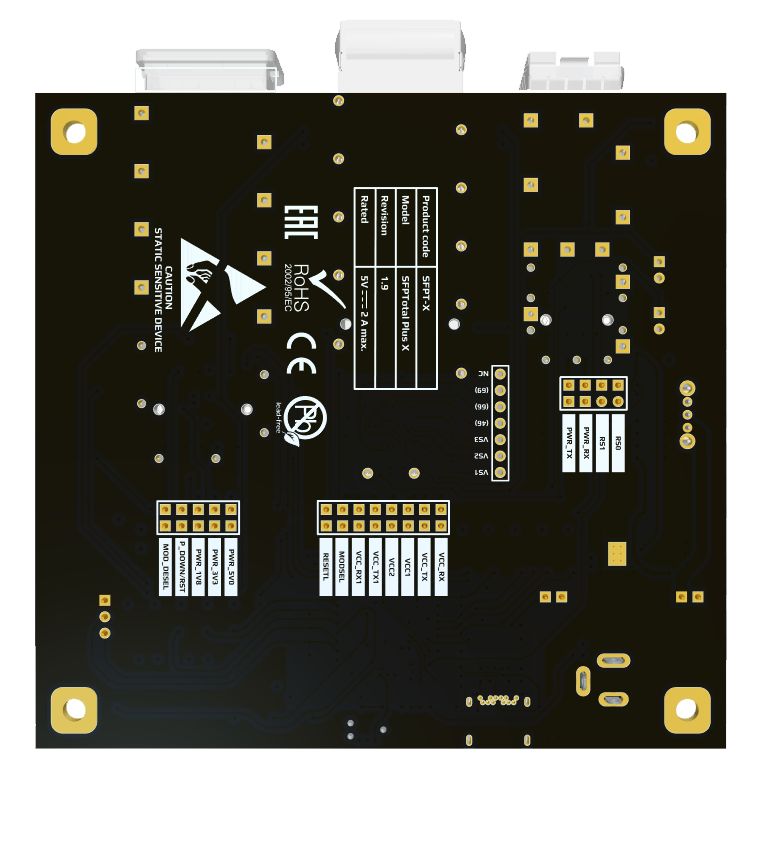
The transceiver ports have a group of jumpers for controlling the power rails and transceiver inputs. The functions of the main jumpers are marked on the front or back of the PCB.
SFP
-
Opening PWR_TX disconnects transmitter power.
-
Opening PWR_RX disconnects receiver power.
-
Closing RS0 and RS1 pulls the corresponding transceiver pins to ground to control the Rate Select lines.
XFP
-
Opening PWR_5V0 disconnects transmitter power on the 5V rail.
-
Opening PWR_3V3 disconnects transmitter power on the 3.3 V rail.
-
The P_DOWN/RST resets the module by switching off power. Open by default.
-
The MOD_DESEL selects the transceiver for data bus access. Open by default and controlled by software.
QSFP
-
Opening VCC_RX disconnects QSFP receiver power.
-
Opening VCC_TX disconnects QSFP transmitter power.
-
The VCC1 disconnects QSFP transceiver controller power.
-
The VCC2 disconnects QSFP-DD transceiver controller power.
-
Opening VCC_RX1 disconnects QSFP-DD receiver power.
-
Opening VCC_TX1 disconnects QSFP-DD transmitter power.
-
The MODSEL selects the transceiver for data bus access. Open by default and controlled by software.
-
The RESETL resets the module. Open by default.
Low power mode
- The TX_EN disables transceiver low power mode. Open by default.
Data bus
The SDA, SCL and GND pins provide access to the I2C data bus. The data bus logic levels correspond to 5V.
Control commands
The SFPTotal Plus X operates using a proprietary command protocol supported by SFPTotal Wizard.
SFPTotal protocol commands provide access to the device's full capabilities for complex programming procedures or specific transceiver control registers.
Note
-
Component labels on the PCB may differ depending on the hardware revision. See the accompanying documentation for details.
-
Embedded firmware updates are available only through SFPTotal service. Contact Support to check whether an update is available.
-
An external 5V DC 2A power adapter is recommended for high power transceivers. Connector polarity is marked on the device PCB.
-
Hardware revision 1.9 includes additional electrostatic discharge protection to improve reliability.