Writing with a password
SFPTotal Wizard supports writing changes to password protected transceiver memory (MSA SFF-8472, SFF-8636). The supported password length is 4 bytes. Enter the password in hexadecimal (HEX) format using uppercase A–F and the digits 0–9. For example: AABBCCDD.
By default, the software writes changes without a password. To set the password used to unlock transceiver memory before writing, and configure where it is entered, use the menu:
Control - Set a password
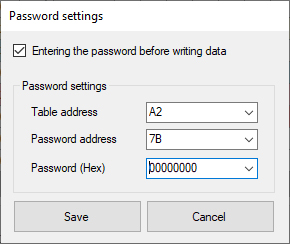
In the settings window, select Entering the password before... to enable password entry before writing changes to transceiver memory. Clear this checkbox to disable password entry.
Specify the password entry parameters:
- Page address — Table address
- Password offset within the page — Password address
- Password value in HEX — Password (Hex)
Click Save to save the settings, or Cancel to cancel the changes. Configure the password before writing changes to transceiver memory.
After applying the settings, the coding board enters the password before writing changes to transceiver memory. Use the write button on the main toolbar to write changes with password entry enabled.
Password list
A list of known passwords for programming write protected transceivers is available in the Firmware Database.
Password entry locations for different transceiver types
The table shows the standard password entry parameters for different transceiver types according to their specifications.
| Module type | Page address | Offset |
|---|---|---|
| SFP / SFP+ | A2 | 7B |
| SFP28 | A2 | 7B |
| XFP | A0 | 7B |
| QSFP+ | A0 | 7B |
| QSFP28 | A0 | 7B |
| QSFP-DD | A0 | 7A |
Device settings that affect the write result
The application may return WRITE FAIL even when the correct password is entered while writing changes to transceiver memory. This occurs when the transceiver is sensitive to the write settings: block size, inter-block delay and data bus clock frequency. Find suitable settings for device operation on the data bus to program transceiver memory successfully.
Open the device settings from the menu Tools - General settings to set suitable parameters.
- Set the write clock frequency between 10,000 and 100,000 Hz
- Set the write block size to 1, 4, 8 or 128 bytes
- Set the inter-block delay between 50 and 250 ms
Note
-
To use password entry, an SFP transceiver must support the A2h table address space. You can check this by reading page A2h: the coding board should complete the operation successfully, and page A2h [00–7F] must not be empty.
-
The page address and password entry offset may differ from the standard if the manufacturer uses a proprietary memory protection mechanism. Check these details with the manufacturer.
-
If the transceiver does not retain changes after a power cycle even though writing returned WRITE OK, use a script to send the transceiver-specific command that saves data to nonvolatile memory.