SFPTotal Whistle
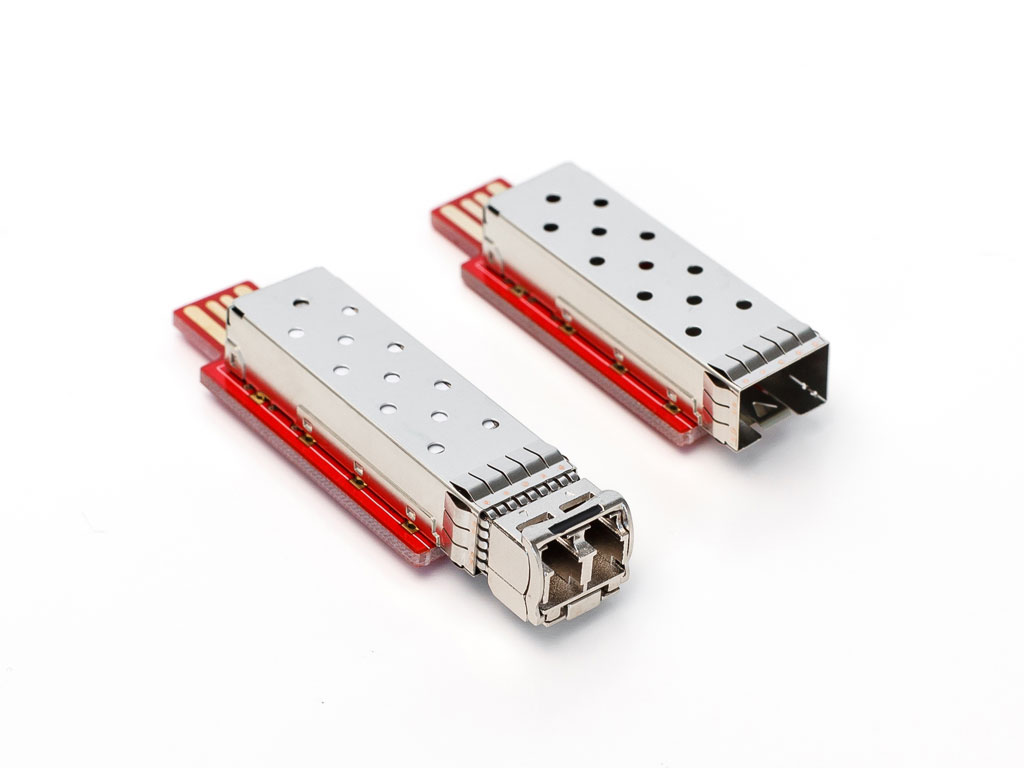
The SFPTotal Whistle coding board is a miniature device for programming the EEPROM of SFP and SFP+ transceivers with a power consumption of up to 1.5 W. The coding board is fully compatible with transceivers designed according to MSA SFF-8074.
The coding board supports programming password protected transceivers according to MSA SFF-8472.
The device has an SFP port for transceivers, a USB 2.0 connector for connection to a PC, and a power LED.
Applications
The coding board is used for the following tasks:
- Reading and writing transceiver memory;
- Programming write protected transceivers;
- Writing changes to transceiver memory to ensure compatibility with switches from different manufacturers;
- Accessing DDMI (DOM) diagnostic information.
Main advantages
- Official software for Windows;
- Compatibility with transceivers from different manufacturers;
- Quick changes to transceiver compatibility parameters;
- Small size and low weight;
- No external power adapter required;
- No cable required for connection to a PC.
Quick start
Installing the device driver
For correct operation, install the FTDI Virtual COM Port drivers before connecting the device for the first time: http://www.ftdichip.com/Drivers/VCP.htm
Original SFPTotal Whistle devices require no additional configuration.
Connect the device directly to a USB 2.0 Type A port without adapters or extension cables. An LED on the underside of the board lights up when the device is connected correctly.
If the FTDI drivers have already been installed, connecting the device to a Windows computer should automatically detect the new device and install its drivers.
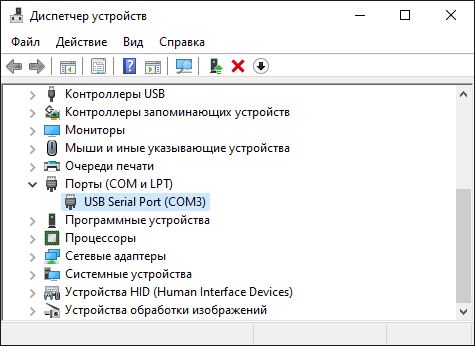
In Device Manager, the device appears as USB Serial Port with its assigned serial port number (for example: COM244). You will need this port number to configure the device connection in SFPTotal Wizard.
Activation key
To work with SFPTotal Wizard, the device must contain a unique digital activation key (Device key). This key authenticates the device and enables the software's main functions for reading and writing transceiver memory.
All original devices are supplied with an activation key preloaded in memory. The key is checked automatically the first time the device is used with the official SFPTotal Wizard software. The computer must be connected to the Internet for verification.
Software
SFPTotal Whistle is compatible with the official SFPTotal Wizard software, version 1.0.4.0 or later. Read the user guide before starting.
The coding board can also work with IC-Prog [1] but that software does not support access to page A2h or password based writing.
Connection settings
- Download and start SFPTotal Wizard;
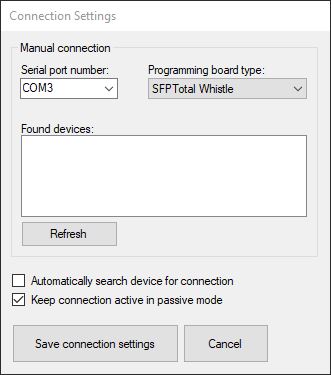
- Open the drop-down menu Connection – Connection settings;
- Clear Automatically search for connection to unlock the device connection settings;
- Click Refresh;
- Select the Serial port number value that matches the COM port assigned to the device;
- Select the Programming board type to match SFPTotal Whistle;
- Click Save connection settings to save the settings;
Transceiver operations
Information about the application's main functions is available in the User Guide section.
Troubleshooting common problems
The following common problems may occur while using the device.
The LED does not light up when the device is plugged in
Check the device orientation. When inserting the device into a horizontal USB port, the metal SFP cage on the board must face upward.
The application returns nothing when reading transceiver memory
Check the connection settings in Connection – Connection settings.
No COM port number is assigned
On Windows computers where other connected devices have already used all 256 reserved COM port numbers, the system cannot automatically assign a new port number because of the FTDI driver behavior. Assign a port number manually. In Device Manager, under Ports (COM & LPT), select the appropriate USB Serial Port device, open Properties - Port Settings - Advanced, and assign a COM port number.
Error: "Can't find FTDI library FTD2XX.DLL"
The FTDI device class library file is missing. Copy FTD2XX.dll into the SFPTotal Wizard application directory. After installing the driver, this file can be found in C:\Windows\System32.
Error: "Slave device has not confirmed the transfer of DeviceAddress: 0xA0"
This error occurs when the coding board receives no acknowledgment from the slave device (transceiver) while addressing table A0h. Possible causes include:
- No transceiver is connected to the coding board port;
- The transceiver is faulty and does not respond;
- The data bus is locked;
- There is a contact problem between the transceiver and the coding board.
Error: "Slave device has not confirm the transfer of offset: 0x00" This error occurs when the coding board receives no acknowledgment from the slave device (transceiver) while writing the offset byte. The transceiver is not ready to perform the operation and continue communication on the data bus.
WRITE FAIL write error
This error indicates that writing to the specified transceiver memory area was unsuccessful. The coding board performed the write, but the verification read could not confirm that the changes were saved in transceiver memory. This usually happens when writing to a protected memory area. Use password entry in Control – Set a password to program password protected transceivers.
Features and limitations
Unlike SFPTotal Mini, the Whistle series uses an FTDI FT232 interface converter and software controlled data bus communication: the application controls the bus line states, rather than a hardware controller.
Software control of the data bus does not allow the communication mode and speed to be adjusted to support the wide variety of transceiver write mechanisms implemented by module manufacturers.
This limits write support for some protected transceivers that are sensitive to clock speed and timing, or whose programming logic differs from the MSA standard.
Software controlled data bus operation cannot provide both a high clock frequency and strict timing when generating the signal sequences needed to read and write transceiver memory. This can be critical when programming transceivers that have a management controller and emulate slave device operation in software.