Writing transceiver memory
How do I write changes to transceiver memory?
To write changes:
- Connect the coding board to your computer and start SFPTotal Wizard;
- Insert the transceiver into the coding board port;
- Select the appropriate transceiver type from the drop-down menu Module Type;
- Select the memory area to read from the menu Address table;
- Make sure the editor contains the correct code;
- Click the button for writing changes to transceiver memory — Write code to module;
The application returns the result when the write operation is complete.
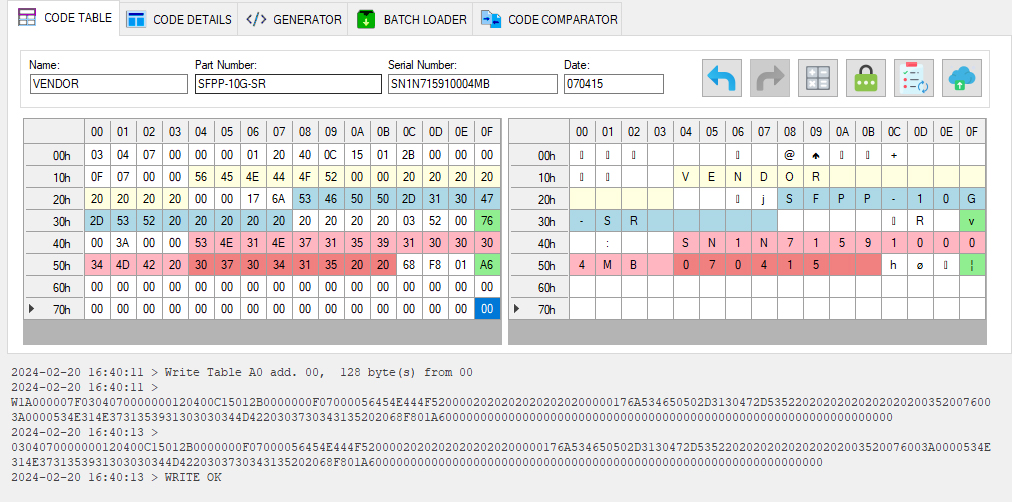
How does writing work?
During a standard write, the coding board generates a sequence of signals on the IIC data bus to transfer data in blocks of 8 bytes. The signal characteristics and timing are selected to successfully program most transceivers available on the market.
After sending the sequence that writes changes to transceiver memory, the coding board automatically reads back the memory area that was written. It then returns the read data to the application for comparison.
If the code segment that was written matches the segment returned by the verification read, the write is considered successful. The application returns the read-back data and the confirmation — WRITE OK.
Otherwise, the application returns WRITE FAIL — the write was unsuccessful.
If an unhandled interruption occurs on the data bus, the application returns an error code QERR.
Why does the application return an error?
The main reason for a write error is that the changes are not saved in transceiver memory. This is usually caused by write protection in the transceiver. Programming write protected transceivers according to the MSA standard requires a password.
See Writing with a password and Types of transceivers by write protection method and how to program them.
A write error is also returned if only part of the data was saved during writing, or if the module's internal mechanisms changed the page data after writing and before the coding board performed the verification read. In this case, adjust the coding board settings to find suitable data bus clock frequency, data block size and inter-block delay settings for writing changes.
Note
Before writing changes to transceiver memory, back up the entire available address space to protect against possible errors.
We also recommend enabling logging to record code segments read from transceiver memory in the operation history. If the memory is accidentally overwritten, this record can help restore the original data and reconstruct the sequence of changes.
Use the backup function to save the original transceiver firmware automatically.